Online class booking for gyms and studios

Every class, every location.
One simple price.

ClassSpot puts your class schedule online, handles bookings and waitlists, and gives your front desk and instructors the tools they use every day. Members can even install it on their phone like an app. You pay by the number of locations, never by classes, members or bookings.

Built in Canada and in daily use at multi-location fitness clubs since 2026.

classes.yourgym.ca
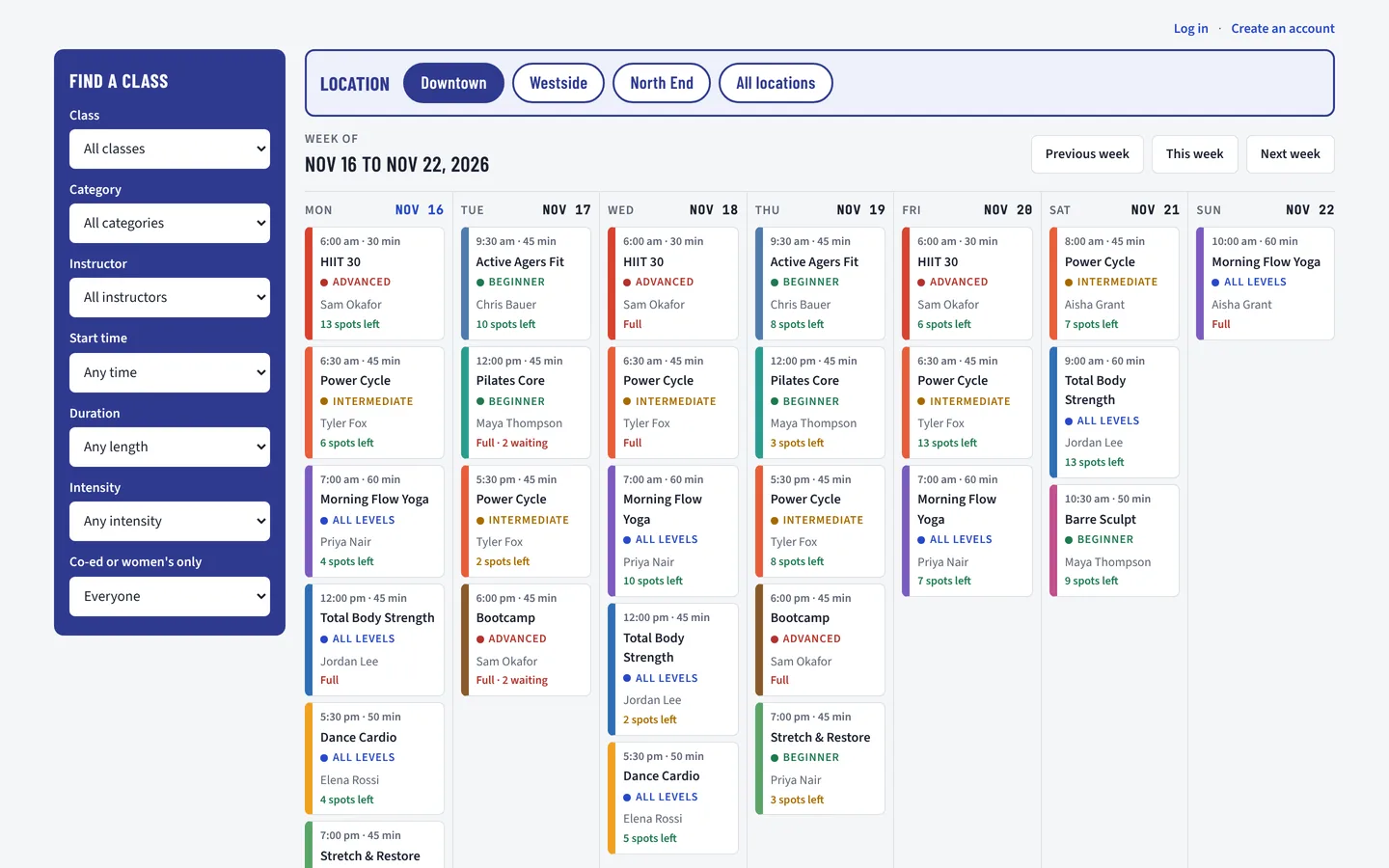
ClassSpot weekly class schedule with a filter panel, location buttons and class cards showing spots left
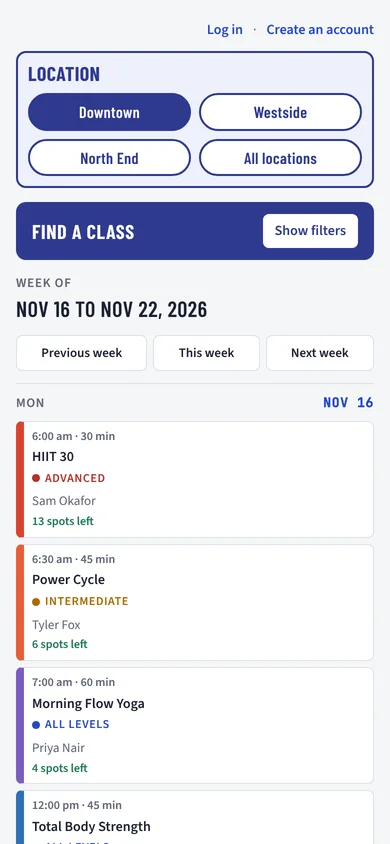
The same schedule on a phone
Why ClassSpot

Booking software shouldn't cost more every time you grow

Many booking platforms charge by the location, the staff login or the number of classes. Open a second studio or add an early-morning class and the bill goes up. With ClassSpot, classes, members, bookings and staff logins are unlimited. The price depends only on how many locations you run. See how that compares with Mindbody, WellnessLiving, Glofox and Zen Planner.

The usual way

  • A fee for each location
  • Extra charges as you add staff or classes
  • Generic booking pages with someone else's branding
  • Support from a call centre that has never seen your gym

ClassSpot

  • A set price by number of locations, with unlimited classes, members and staff logins
  • Your logo, your colours and your own web address
  • Set up for you, including your member list and your timetable
  • A Canadian team you can actually call
1–99locations, all on one schedule
500 / hourbooking emails, sent as they're needed
Unlimitedmembers, booking 24/7 from any phone
Canada or USdata stored where you prefer, based on your location
Features

Made with a working gym, not in a boardroom

Every feature came from a real request by a real front desk. Here are the highlights for each person who uses it.

Members

Book from any phone

  • Weekly schedule with filters for class, time, intensity and instructor
  • One-click booking, and a waitlist that offers open spots by email
  • Confirmations with a calendar file and reminders before class
  • Installs on the home screen as a web app
All member features →
Front desk

The day under control

  • Add or remove members in any class
  • Substitute instructor, room or time change for one date
  • Cancel a class with a reason; members are emailed for you
  • Print class lists with a check-in column
All front desk features →
Instructors

Their own login

  • Only the classes they teach, with who's booked and waiting
  • Class lists to print, download or email
  • Email everyone in a class
  • Book classes as a member with the same login
All instructor features →
Owners

Every location in one place

  • Locations, rooms and a colour-coded class library
  • Your logo and brand colours everywhere
  • Staff access levels and holiday closures
  • A change log of who changed what
All owner features →
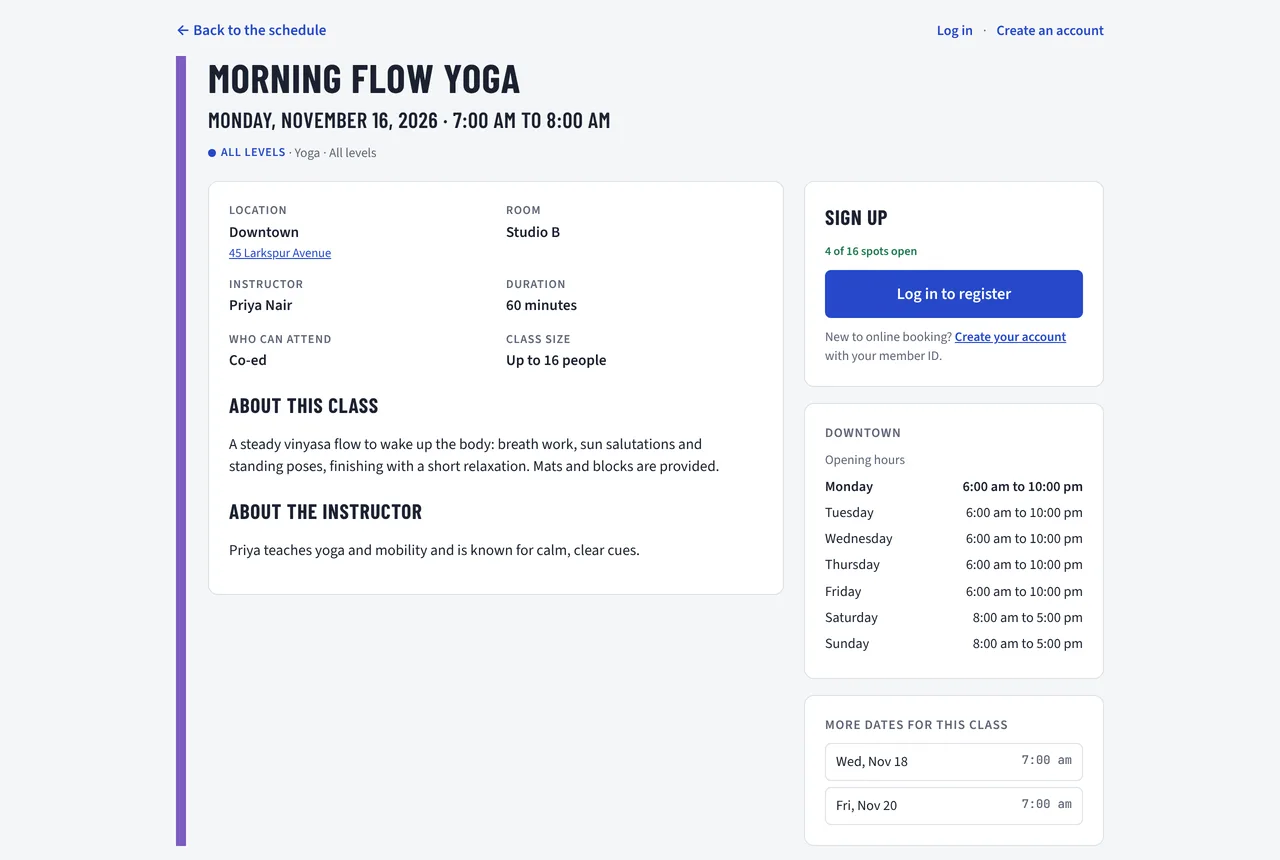
Class page with class details, instructor, opening hours and the sign-up box
Fits your website

Your schedule, on your site

ClassSpot sits inside the website you already have. We give you one snippet to paste into a page on any website builder that accepts an HTML embed, and your members book without leaving your site.

  • Each location can have its own page that opens on its own schedule
  • Emails come from your own address, with your logo
  • Works on phones, tablets and computers
Web app included

On your members' home screen

ClassSpot is also a web app. Members add it to their phone's home screen and it opens full screen with your logo, just like an app from the store. There's nothing to publish in an app store and no extra cost.

  • Works on iPhone and Android
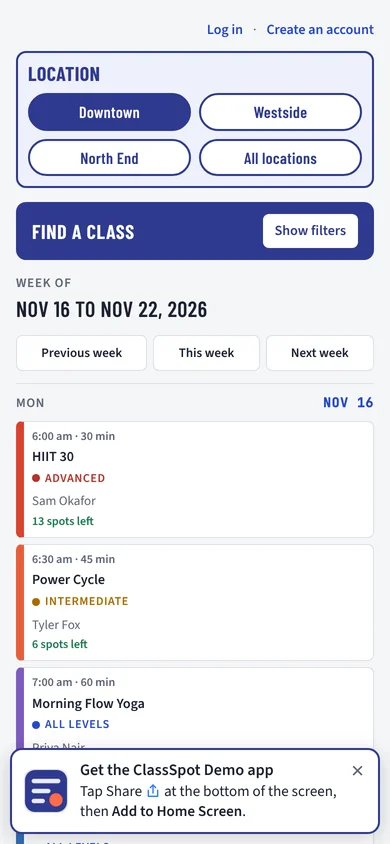
  • A banner at the bottom of the screen shows members how to install it
  • A QR code on the desktop schedule takes members straight to it on their phone
  • Always up to date, with no app updates to download
  • Your logo as the app icon and your studio name under it
The schedule on a phone with the banner at the bottom: Get the app, tap Share then Add to Home Screen
Getting started

We set it up with you

You don't have to configure anything on your own. We handle each step with you, from the first call until your members are booking.

Walk-through

We look at your timetable, locations and how your front desk works today.

Your data in

We load your locations, rooms, classes and instructors, and import your member list.

Your look

Your logo, colours, email address and web address. We add the schedule to your website.

Go live

We train your staff, send members an invitation, and stay on call for the first weeks.

Pricing

Priced by locations, nothing else

Every plan has every feature, with unlimited classes, members, bookings and staff logins.

1 or 2 locations
$79 CAD / month
  • Hosting in Canada or the US
  • Your own database
  • Booking, waitlist and reminder emails
  • Security certificates (https)
  • The web app for your members
  • Unlimited classes, members and staff logins
Get started
3 to 5 locations
$169 CAD / month
  • Hosting in Canada or the US
  • Your own database
  • Booking, waitlist and reminder emails
  • Security certificates (https)
  • The web app for your members
  • Unlimited classes, members and staff logins
Get started
6 or more locations
$209 CAD / month
  • Hosting in Canada or the US
  • Your own database
  • Booking, waitlist and reminder emails
  • Security certificates (https)
  • The web app for your members
  • Unlimited classes, members and staff logins
Get started

Prices in Canadian dollars.

One-time setup and deployment fee of $995 CAD on monthly plans. Waived on annual plans. Setup covers loading your locations, rooms, classes, instructors and member list, adding your logo and colours, connecting your email address and putting the schedule on your website.

Live demo

Try it yourself

The demo is a made-up studio with three locations, real-looking classes and members. Book a class, join a waitlist, then log in as staff and see it from the other side. Everything resets every night, and the demo sends no emails.

Member[email protected]Book classes and manage your bookings
Admin[email protected]Every screen, every location
Front desk[email protected]Staff login for one location
Instructor[email protected]Only the classes they teach

The password for all demo logins is ClassSpot-demo

Questions

Good to know

Does ClassSpot take payments or sell memberships?

No. ClassSpot handles class booking. Members sign up with the member ID from the membership or billing system you already use, and the front desk can switch an account off when a membership ends.

Do my members need to download an app?

No download from an app store is needed. Everything works in the web browser, and members who want an app can install ClassSpot as a web app in two taps. A banner at the bottom of the screen shows them how on iPhone and Android.

Where is our data stored?

In Canada or the United States, whichever you prefer. Canadian studios are usually hosted in Montréal. Only your staff can see member details. Each studio's data is kept separate from every other studio's.

We're moving from another booking system. Can you bring our members over?

Yes. Send us a spreadsheet export of your members and we import it. Members then set their own password the first time they log in.

Can we have more than one location?

Yes, as many as you run, at the same price. Staff logins can be limited to their own location, and members pick their usual location so the schedule opens there.

What about trial members and drop-ins?

Trial accounts can book one class. You can also mark classes as members-only, for example classes in hours when no staff is on site.
Contact

Let's look at your schedule together

Tell us about your studio and we'll show you what ClassSpot would look like for your locations and classes.

Prefer email? [email protected]

Made in Canada.

We use your details only to reply to you. They're stored in Canada and never shared.